Showing posts with label Apache. Show all posts

Sunday, 11 December 2016

COMODO SSL Certificate Installation with A+ Rating

SSL(Secure Sockets Layer) certificate is must for any e-commerce or data based applications. Because, nowadays to run any social applications like Google or Facebook, SSL/HTTPS URL is must to get geo location or any map related stuff. Long time back, I have already discussed with the installation of SSL certificate. But, I missed few configuration settings to get A+ rating for the website. A+ rating helps in standard approval for the website to work smoothly in all and any platform.

COMODO SSL Certificate Installation A+ Rating.

Read more »
Share:

Thursday, 11 December 2014

Hello World !!! using Apache Cordova and Visual Studio 2013

You heard it right, this is for all the .NET Developers (other platform also welcome) who have ever wished to build an app using Apache Cordova that targets multiple mobile platforms: Android, iOS, Windows, and Windows Phone.

Disclaimer: All images are copyright to their respective owners.

I am going to show you a very simple mobile application which displays Hello World, using apache Cordova and Visual Studio 2013.

1. Setup the environment by installing the Preview of Visual Studio Tooling Support for Apache Cordova, you can download the CTP from here.

Visual Studio Tools for Apache Cordova

image

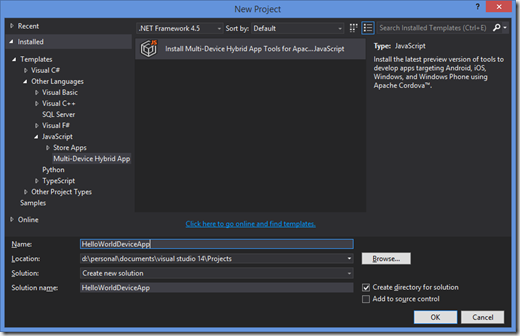
2. Once the installation is complete, run Visual Studio 2013 and create a new project. You need to go to Javascript templates or you can select the Multi device Hybrid App and click OK button. this will give you default project structure
image

image

3. For this post I am not going to explain all the files, rather I will go directly to my index.html and change the default text Hello World !!! and we are done.

image

4. And finally select the desired Emulators and run the program.

image

And here is the output, that’s it and you are done.

image

You can double click on config.xml file to customize the Custom and Core properties of your application individually for each platforms.

image

Hope this makes your life simple Smile Enjoy.

Other helpful link:

http://msopentech.com/blog/2014/05/12/apache-cordova-integrated-visual-studio/

http://msdn.microsoft.com/en-us/library/dn757054.aspx

Share:

Tuesday, 12 August 2014

Building Native iPhone Applications using HTML, CSS and JavaScript

Mobile revolution has been started, now right time to build mobile applications for your web projects. This tutorial will help you how to develop native iOS mobile applications using HTML, CSS and Jquery. Apache Cordova is a platform for building native applications and it is providing device APIs that helps you to access native device functions such as GEO location or mobile camera. If you are a Apple Mavericks use just implement the following steps.

Building Native Mobile Applications using HTML, CSS and JavaScript

Read more »
Share:

Tuesday, 19 November 2013

Htaccess File Tutorial and Tips.

After posting Understanding of Regular Expression article most of my readers are expecting .htaccess basics, and I did not find any useful article on Google first page results. Specially I love to write .htaccess file, using this you can easily configure and redirect Apache Web Server file system. This post will explain you how to create friendly URLs, sub domain directory re-directions and many more.

Understanding Htaccess Redirect
Read more »
Share: