Showing posts with label Crash Reporting. Show all posts

Tuesday, 19 September 2017

7 tips for getting the most out of Crashlytics

Originally posted on the Fabric Blog by Jason St. Pierre, Product Manager

For many years, developers and app teams have relied on Crashlytics to improve their app stability. By now, you're probably familiar with the main parts of the Crashlytics UI; perhaps you even glance at crash-free users, crash-free sessions, and the issues list multiple times a day (you wouldn't be the only one!).

In this post, we want to share 7 pro-tips that will help you get even more value out of Crashlytics, which is now part of the new Fabric dashboard, so you can track, prioritize, and solve issues faster.

1. Speed up your troubleshooting by checking out crash insights

In July, we officially released crash insights out of beta. Crash insights helps you understand your crashes better by giving you more context and clarity on why those crashes occurred. When you see a green lightning bolt appear next to an issue in your issues list, click on it to see potential root causes and troubleshooting resources.

2. Mark resolved issues as "closed" to track regressions

Debugging and troubleshooting crashes is time-consuming, hard work. As developers ourselves, we understand the urge to sign-off and return to more exciting tasks (like building new app features) as soon you resolve a pesky issue - but don't forget to mark this issue as "closed" in Crashlytics! When you formally close out an issue, you get enhanced visibility into that issue's lifecycle through regression detection. Regression detection alerts you when a previously closed issue reoccurs in a new app version, which is a signal that something else may be awry and you should pay close attention to it.

3. Close and lock issues you want to ignore and declutter your issue list

As a general rule of thumb, you should close issues so you can monitor regression. However, you can also close and lock issues that you don't want to be notified about because you're unlikely to fix or prioritize them. These could be low-impact, obscure bugs or issues that are beyond your control because the problem isn't in your code. To keep these issues out of view and declutter your Crashlytics charts, you can close and lock them. By taking advantage of this "ignore functionality", you can fine tune your stability page so only critical information that needs action bubbles up to the top.

4. Use wildcard builds as a shortcut for adding build versions manually

Sometimes, you may have multiple builds of the same version. These build versions start with the same number, but the tail end contains a unique identifier (such as 9.12 (123), 9.12 (124), 9.12 (125), etc). If you want to see crashes for all of these versions, don't manually type them into the search bar. Instead, use a wildcard to group similar versions together much faster. You can do this by simply adding a star (aka. an asterisk) at the end of your version prefix (i.e. 9.12*). For example, if you use APK Splits on Android, a wildcard build will quickly show you crashes for the combined set of builds.

5. Pin your most important builds to keep them front and center

As a developer, you probably deploy a handful of builds each day. As a development team, that number can shoot up to tens or hundreds of builds. The speed and agility with which mobile teams ship is impressive and awesome. But you know what's not awesome? Wasting time having to comb through your numerous builds to find the one (or two, or three, etc.) that matter the most. That's why Crashlytics allows you to "pin" key builds so that they appear at the top of your builds list. Pinned builds allow you to find your most important builds faster and keep them front and center, for as long as you need. Plus, this feature makes it easier to collaborate with your teammates on fixing crashes because pinned builds will automatically appear at the top of their builds list too.

6. Pay attention to velocity alerts to stay informed about critical stability issues

Stability issues can pop up anytime - even when you're away from your workstation. Crashlytics intelligently monitors your builds to check if one issue has caused a statistically significant number of crashes. If so, we'll let you know if you need to ship a hot fix of your app via a velocity alert. Velocity alerts are proactive alerts that appear right in your crash reporting dashboard when an issue suddenly increases in severity or impact. We'll send you an email too, but you should also install the Fabric mobile app, which will send you a push notification so you can stay in the loop even on the go. Keep an eye out for velocity alerts and you'll never miss a critical crash, no matter where you are!

7. Use logs, keys, and non-fatals in the right scenarios

The Crashlytics SDK lets you instrument logs, keys, non-fatals, and custom events, which provide additional information and context on why a crash occurred and what happened leading up to it. However, logs, keys, non-fatals, and custom events are designed to track different things so let's review the right way to use them.

Logs: You should instrument logs to gather important information about user activity before a crash. This could be user behavior (ex. user went to download screen, clicked on download button) to details about the user's action (ex. image downloaded, image downloaded from). Basically, logs are breadcrumbs that show you what happened prior to a crash. When a crash occurs, we take the contents of the log and attach it to the crash to help you debug faster. Here are instructions for instrumenting logs for iOS, Android, and Unityapps.

Keys: Keys are key value pairs, which provide a snapshot of information at one point in time. Unlike logs, which record a timeline of activity, keys record the last known value and change over time. Since keys are overwritten, you should use keys for something that you would only want the last known value for. For example, use keys to track the last level a user completed, the last step a user completed in a wizard, what image the user looked at last, and what the last custom settings configuration was. Keys are also helpful in providing a summary or "roll-up" of information. For instance, if your log shows "login, retry, retry, retry" your key would show "retry count: 3." To set up keys, follow these instructions for iOS, Android, and Unityapps.
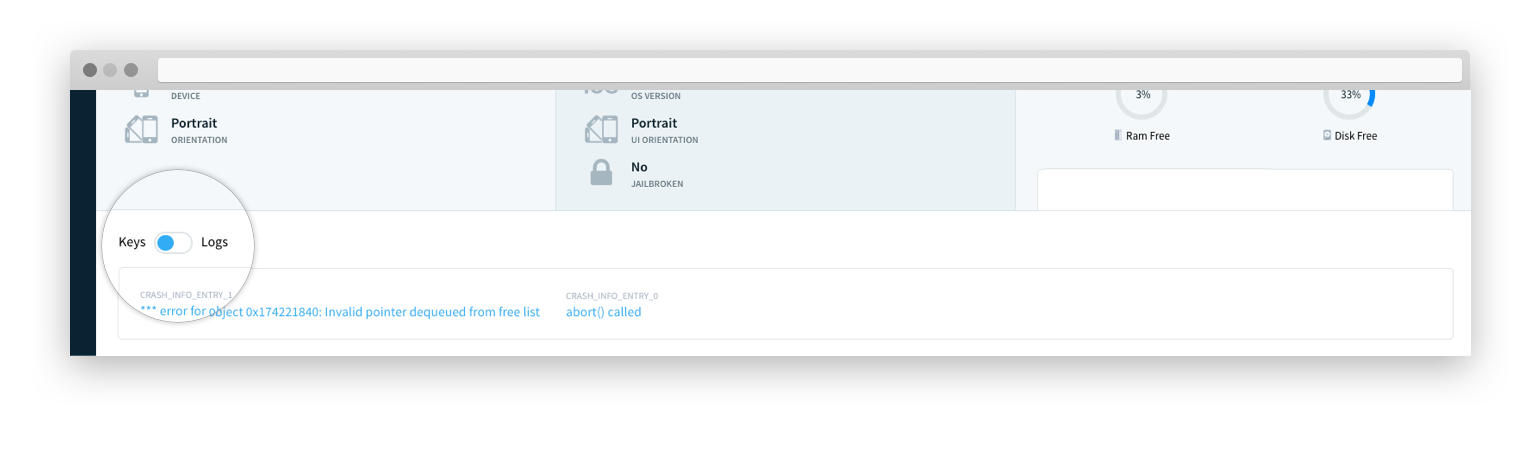
Non-fatals: While Crashlytics captures crashes automatically, you can also record non-fatal events. Non-fatal events mean that your app is experiencing an error, but not actually crashing.

For example, a good scenario to log a non-fatal is if your app has deep links, but fails to navigate to them. A broken link isn't something that will necessarily crash your app, but it's something you'd want to track so you can fix the link. A bad scenario to log a non-fatal is if an image fails to load in your app due to a network failure because this isn't actionable or specific.

You should set up non-fatal events for something you want the stack trace for so you can triage and troubleshoot the issue.

If you simply want to count the number of times something happens (and don't need the stack trace), we'd recommend checking out custom events.

These 7 tips will help you get the most out of Crashlytics. If you have other pro-tips that have helped you improve your app stability with Crashlytics, tweet them at us! We can't wait to learn more about how you use Crashlytics.

Get Crashlytics

Share:

Wednesday, 4 January 2017

Some Tips for Boosting your App's Quality in 2017


Doug Stevenson
Doug Stevenson
Developer Advocate

I've got to come clean with everyone: I'm making no new year's resolutions for 2017. Nor did I make any in 2016. In fact, I don't think I've ever made one! It's not so much that I take a dim view of new year's resolutions. I simply suspect that I would likely break them by the end of the week, and feel bad about it!

One thing I've found helpful in the past is to see the new year as a pivoting point to try new things, and also improve the work I'm already doing. For me (and I hope for you too!), 2017 will be a fresh year for boosting app quality.

The phrase "app quality" can take a bunch of different meanings, based on what you value in the software you create and use. As a developer, traditionally, this means fixing bugs that cause problems for your users. It could also be a reflection of the amount of delight your users take in your app. All of this gets wrapped up into the one primary metric that we have to gauge the quality of a mobile app, which is your app's rating on the store where it's published. I'm sure every one of you who has an app on a storefront has paid much attention to the app's rating at some point!

Firebase provides some tools you can use to boost your app's quality, and if you're not already using them, maybe a fresh look at those tools would be helpful this year?

Firebase Crash Reporting

The easiest tool to get started with is Firebase Crash Reporting. It takes little to no lines of code to integrate it into your iOS and Android app, and once you do, the Firebase console will start showing crashes that are happening to your users. This gives you a "hit list" of problems to fix.
One thing I find ironic about being involved with the Crash Reporting team is how we view the influx of total crashes received as we monitor our system. Like any good developer product, we strive to grow adoption, which means we celebrate graphs that go "up and to the right". So, in a strange sense, we like to see more crashes, because that means more developers are using our stuff! But for all of you developers out there, more crashes is obviously a *bad* thing, and you want to make those numbers go down! So, please, don't be like us - make your crash report graphs go down and to the right in 2017!

Firebase Test Lab for Android

Even better than fixing problems for your users is fixing those problems before they even reach your users. For your Android apps, you can use Firebase Test Lab to help ensure that your apps work great for your users among a growing variety of actual devices that we manage. Traditionally, it's been kind of a pain to acquire and manage a good selection of devices for testing. However, with Test Lab, you simply upload your APK and tests, and it will install and run them to our devices. After the tests complete, we'll provide all the screenshots, videos, and logs of everything that happened for you to examine in the Firebase console.

With Firebase Test Lab for Android now available with generous daily quotas at no charge for projects on the free Spark tier, 2017 is a great time to get started with that. And, if you haven't set up your Android app builds in a continuous integration environment, you could set that up, then configure it to run your tests automatically on Test Lab.

If you're the kind of person who likes writing tests for your code (which is, admittedly, not very many of us!), it's natural to get those tests running on Test Lab. But, for those of us who aren't maintaining a test suite with our codebase, we can still use Test Lab's automated Robo test to get automated test coverage right away, with no additional lines of code required. That's not quite that same as having a comprehensive suite of tests, so maybe 2017 would be a good time to learn more about architecting "testable" apps, and how those practices can raise the bar of quality for your app. I'm planning on writing more about this later this year, so stay tuned to the Firebase Blog for more!

Firebase Remote Config

At its core, Firebase Remote Config is a tool that lets you configure your app using parameters that you set up in the Firebase console. It can be used to help manage the quality of your app, and there's a couple neat tricks you can do with it. Maybe this new year brings new opportunities to give them a try!

First of all, you can use Remote Config to carefully roll out a new feature to your users. It works like this:
  1. Code your new feature and restrict its access to the user by a Remote Config boolean parameter. If the value is 'false', your users don't see the feature. Make 'false' the default value in the app.
  2. Configure that parameter in the Firebase console to also be initially 'false' for everyone.
  3. Publish your app to the store.
  4. When it's time to start rolling out the new feature to a small segment of users, configure the parameter to be 'true' for, say, five percent of your user base.
  5. Stay alert for new crashes in Firebase Crash Reporting, as well as feedback from your users.
  6. If there is a problem with the new feature, immediately roll back the new feature by setting the parameter to 'false' in the console for everyone.
  7. Or, if things are looking good, increase the percentage over time until you reach 100% of your users.


This is much safer than publishing your new feature to everyone with a single app update, because now you have the option to immediately disable a serious problem, and without having to build and publish a whole new version of your app. And, if you can act quickly, most of your users will never encounter the problem to begin with. This works well with the email alerts you get from Firebase Crash Reporting when a new crash is observed.

Another feature of Remote Config is the ability to experiment with some aspect of your app in order to find out what works better for the users of your app, then measure the results in Firebase Analytics. I don't know about you, but I'm typically pretty bad at guessing what people actually prefer, and sometimes I'm surprised at how people might actually *use* an app! Don't guess - instead, do an experiment and know /for certain/ what delights your users more! It stands to reason that apps finely tuned like this can get better ratings and make more money.

Firebase Realtime Database

It makes sense that if you make it easier for you user to perform tasks in your app, they will enjoy using it more, and they will come back more frequently. One thing I have always disliked is having to check for new information by refreshing, or navigating back and forward again. Apps that are always fresh and up to date, without requiring me to take action, are more pleasant to use.

You can achieve this for your app by making effective use of Firebase Realtime Databaseto deliver relevant data directly to your users at the moment it changes in the database. Realtime Database is reactive by nature, because the client API is designed for you set up listeners at data locations that get triggered in the event of a change. This is far more convenient than having to poll an API endpoint repeatedly to check for changes, and also much more respectful of the user's mobile data and battery life. Users associate this feeling of delight with apps of high quality.

What does 2017 have in store for your app?

I hope you'll join me this year in putting more effort into making our users even more delighted. If you're with me, feel free to tweet me at @CodingDoug and tell me what you're up to in 2017!
Share:

Wednesday, 21 December 2016

How does Firebase initialize on Android?

Doug Stevenson
Doug Stevenson
Developer Advocate

If you've been working with Firebase on Android, you may have noticed that you don't normally have to write any lines of code to initialize a feature. You just grab the singleton object for that feature, and start using it right away. And, in the case of Firebase Crash Reporting, you don't even have to write any code at all for it to start capturing crashes! This question pops up from time to time, and I talked about it a bit at Google I/O 2016, but I'd also like to break it down in detail here.

The problem

Many SDKs need an Android Contextto be able to do their work. This Context is the hook into the Android runtime that lets the SDK access app resources and assets, use system services, and register BroadcastReceivers. Many SDKs ask you to pass a Context into a static init method once, so they can hold and use that reference as long as the app process is alive. In order to get that Context at the time the app starts up, it's common for the developers of the SDK to ask you to pass that in a custom Applicationsubclass like this:

public class MyApplication extends Application {
@Override
public void onCreate() {
super.onCreate();
SomeSdk.init(this); // init some SDK, MyApplication is the Context
}
}

And if you hadn't already registered a custom subclass in your app, you'd also have to add that to your manifest in the applicationtag's android:name attribute:

<application
android:icon="@mipmap/ic_launcher"
android:label="@string/app_name"
android:name="package.of.MyApplication"
... >

All this is fine, but Firebase SDKs make this a lot easier for its users!

The solution

There is a little trick that the Firebase SDKs for Android use to install a hook early in the process of an application launch cycle. It introduces a ContentProviderto implement both the timing and Context needed to initialize an SDK, but without requiring the app developer to write any code. A ContentProvider is a convenient choice for two reasons:

  1. They are created and initialized (on the main thread) before allother components, such as Activities, Services, and BroadcastReceivers, after the app process is started.
  2. They participate in manifest merging at build time, if they are declared in the manifest of an Android library project. As a result, they are automatically added to the app's manifest.

Let's investigate those two properties.

ContentProvider initializes early

When an Android app process is first started, there is well-defined order of operations:

  1. Each ContentProvider declared in the manifest is created, in priority order.
  2. The Application class (or custom subclass) is created.
  3. If another component that was invoked via some Intent, that is created.

When a ContentProvider is created, Android will call its onCreate method. This is where the Firebase SDK can get a hold of a Context, which it does by calling the getContextmethod. This Context is safe to hold on to indefinitely.

This is also a place that can be used to set up things that need to be active throughout the app's lifetime, such as ActivityLifecycleCallbacks(which are used by Firebase Analytics), or a UncaughtExceptionHandler(which is used by Firebase Crash Reporting). You might also initialize a dependency injection framework here.

ContentProviders participate in manifest merger

Manifest merge is a process that happens at build time when the Android build tools need to figure out the contents of the final manifest that defines your app. In your app's AndroidManifest.xml file, you declare all your application components, permissions, hardware requirements, and so on. But the final manifest that gets built into the APK contains all of those elements from all of the Android library projects that your app depends on.

It turns out that ContentProviders are merged into the final manifest as well. As a result, any Android library project can simply declare a ContentProvider in its own manifest, and that entry will end up in the app's final manifest. So, when you declare a dependency on Firebase Crash Reporting, the ContentProvider from its manifest is merged in your own app's manifest. This ensures that its onCreate is executed, without you having to write any code.

FirebaseInitProvider (surprise!) initializes your app

All apps using Firebase in some way will have a dependency on the firebase-common library. This library exposes FirebaseInitProvider, whose responsibility is to call FirebaseApp.initializeAppin order to initialize the default FirebaseApp instance using the configurations from the project's google-services.json file. (Those configurations are injected into the build as Android resources by the Google Services plugin.) However, If you're referencing multiple Firebase projects in one app, you'll have to write code to initialize other FirebaseApp instances, as discussed in an earlier blog post.

Some drawbacks with ContentProvider init

If you choose to use a ContentProvider to initialize your app or library, there's a couple things you need to keep in mind.

First, there can be only one ContentProvider on an Android device with a given "authority" string. So, if your library is used in more than one app on a device, you have to make sure that they get added with two different authority strings, or the second app will be rejected for installation. That string is defined for the ContentProvider in the manifest XML, which means it's effectively hard-coded. But there is a trick you can use with the Android build tools to make sure that each app build declares a different authority.

There is a feature of Android Gradle builds call manifest placeholders that lets you declare and insert a placeholder value that get inserted into manifest strings. The app's unique application ID is automatically available as a placeholder, so you can declare your ContentProvider like this:

<provider
android:authorities="${applicationId}.yourcontentprovider"
android:name=".YourContentProvider"
android:exported="false" />

The other thing to know about about ContentProviders is that they are only run in the main process of an app. For a vast majority of apps, this isn't a problem, as there is only one process by default. But the moment you declare that one of the Android components in your app must run in another process, that process won't create any ContentProviders, which means your ContentProvider onCreate will never get invoked. In this case, the app will have to either avoid calling anything that requires the initialization, or safely initialize another way. Note that this behavior is different than a custom Application subclass, which does get invoked in every process for that app.

But why misuse ContentProvider like this?

Yes, it's true, this particular application of ContentProvider seems really weird, since it's not actually providing any content. And you have to provide implementations of all the other ContentProvider required methods by returning null. But, it turns out that this is the most reliable way to automatically initialize without requiring extra code. I think the convenience for developers using Firebase more than makes up for this strangeness of this use of a ContentProvider. Firebase is all about being easy to use, and there's nothing easier than no code at all!

Share:

Thursday, 8 December 2016

Firebase Crash Reporting Full Release

Doug Stevenson
Doug Stevenson
Developer Advocate


Firebase Crash Reportinghas enjoyed rapid adoption since its beta launch at Google I/O 2016. So far, we helped identify hundreds of millions of errors to help developers provide the best possible experience for users. Firebase Crash Reporting is now fully released, with many new features and enhancements to help you better diagnose and respond to crashes that affect the users of your iOS and Android mobile applications. Read on to discover what's new!

Issue Resolution

One of the most hotly requested features is the ability to mark an error cluster as "closed" in the dashboard, in order to indicate that the issue should be fixed, and that the next release should no longer generate that particular kind of crash. In the event of a regression in a future version, the crash cluster will be automatically reopened for context.

Improved Reporting Latency

The time it takes for a crash to be reported until the moment it appears in your console has been drastically decreased from about twenty minutes to less than a minute. We expect this improvement, in addition to email alerts, will improve your ability to diagnose errors as they happen.

Email Alerts

Anyone who has access to your Firebase project can arrange to receive an email alert if we see brand new clusters of errors, or errors that have regressed after being marked as closed. You can use this to quickly triage and respond to errors, in order to minimize the impact of a defect on your users.

Analytics events in Crash Logs

Firebase Analyticsevents are now added to your crash logs, which gives you a more complete view of the state of your app leading up to crash. This added context will also help you observe how crashes may be impacting your revenue and critical conversion events.

Mobile-Friendly Console

The Crash Reporting console has been improved for use on mobile devices. Its new responsive design makes it easy to check on the health of your apps when you're away from your desktop computer.

Android SDK Compatibility

The first release of the Android SDK had a limitation that prevented it from working well with some apps that declare an Application class. This limitation has been resolved, and Firebase Crash Reporting should work well with any Android app.

Updated Support for Swift on iOS

The service has been updated to show symbols from apps written in Swift 2 and 3.

We want your feedback!

If you decide to give Firebase Crash Reporting a try, please let us know how it went for you. For any questions about Crash Reporting or any other Firebase feature, please use the firebase-talkforum, or if it's a programming question, you can use the firebase tag on Stack Overflow.

Share:

Monday, 7 November 2016

Live from the Firebase Dev Summit in Berlin: Firebase, six months after I/O

Francis Ma
Francis Ma
Firebase Product Manager

Our goal with Firebase is to help developers build better apps and grow them into successful businesses. Six months ago at Google I/O, we took our well-loved backend-as-a-service (BaaS) and expanded it to 15 features to make it Google’s unified app development platform, available across iOS, Android, and the web.

We launched many new features at Google I/O, but our work didn’t stop there. Since then, we’ve learned a lot from you (750,000+ projects created on Firebase to date!) about how you’re using our platform and how we can improve it. Thanks to your feedback, today we’re launching a number of enhancements to Crash Reporting, Analytics, support for game developers and more. For more information on our announcements, tune in to the livestream video from Firebase Dev Summit in Berlin. They’re also listed here:

Improve App Quality to Deliver Better User Experiences

Firebase Crash Reporting comes out of Beta and adds a new feature that helps you diagnose and reproduce app crashes.

Often the hardest part about fixing an issue is reproducing it, so we’ve added rich context to each crash to make the process simple. Firebase Crash Reporting now shows Firebase Analytics event data in the logs for each crash. This gives you clarity into the state of your app leading up to an error. Things like which screens of your app were visited are automatically logged with no instrumentation code required. Crash logs will also display any custom events and parameters you explicitly log using Firebase Analytics. Firebase Crash Reporting works for both iOS and Android apps.

Glide, a popular live video messaging app, relies on Firebase Crash Reporting to ensure user quality and release agility. “No matter how much effort you put into testing, it will never be as thorough as millions of active users in different locations, experiencing a variety of network conditions and real life situations. Firebase allows us to rapidly gain trust in our new version during phased release, as well as accelerate the process of identifying core issues and providing quick solutions.” - Roi Ginat, Founder, Glide.

Firebase Test Lab for Android supports more devices and introduces a free tier.

We want to help you deliver high-quality experiences, so testing your app before it goes into the wild is incredibly important. Firebase Test Lab allows you to easily test your app on many physical and virtual devices in the cloud, without writing a single line of test code. Beginning today, developers on the Spark service tier (which is free!) can run five tests per day on physical devices and ten tests per day on virtual devices—with no credit card setup required. We’ve also heard that you want more device options, so we’ve added 11 new popular Android device models to Test Lab, available today.

Illustration of Firebase Crash Reporting

Make Faster Data Driven Decisions with Firebase Analytics

Firebase Analytics now offers live conversion collection, a new integration with Google “Data Studio”, and real-time exporting to BigQuery.

We know that your data is most actionable when you can see and process it as quickly as possible. Therefore, we’re announcing a number of features to help you maximize the potential of your analytics events:

  1. Real-time uploading of conversion events
  2. Real-time exporting to BigQuery
  3. DebugView for validation of your analytics instrumentation is currently offered in limited availability and will be made more broadly available later this year

We were happy to give you a sneak preview at the Firebase Dev Summit of a new feature we are now building, StreamView, which will offer a live, dynamic view of your analytics data as it streams in.

To further enhance your targeting options, we’ve improved the connection between Firebase Analytics and other Firebase features, such as Dynamic Links and Remote Config. For example, you can now use Dynamic Links on your Facebook business page, and we can identify Facebook as a source in Firebase Analytics reporting. Also, you can now target Remote Config changes by User Properties, in addition to Audiences.

Build Better Games using Firebase

Firebase now has a Unity plugin!

Game developers are building great apps, and we want Firebase to work for you, too. We’ve built an entirely new plugin for Unity that supports Analytics, the Realtime Database, Authentication, Dynamic Links, Remote Config, Notifications and more. We've also expanded our C++ SDK with Realtime Database support.

Integrate Firebase Even Easier with Open-Sourced UI Library

FirebaseUI is updated to v1.0.

FirebaseUI is a library that provides common UI elements when building apps, and it’s a quick way to integrate with Firebase. FirebaseUI 1.0 includes a drop-in UI flow for Firebase Authentication, with common identity providers such as Google, Facebook, and Twitter. FirebaseUI 1.0 also added features such as client-side joins and intersections for the Realtime Database, plus integrations with Glide and SDWebImage that make downloading and displaying images from Firebase Storage a cinch. Follow our progress or contribute to our Android, iOS, and Web components on Github.

Learn More via Udacity and Join the Firebase Community

We want to provide the best tool for developers, but it’s also important that we give resources and training to help you get more out of the platform. As such, we’ve created a new Udacity course: Firebase in a Weekend! It’s an instructor-led video course to help all developers get up and running with Firebase on iOS and Android, in two days.

Finally, to help wrap your head around all our announcements, we’ve created a new demo app. This is an easy way to see how Analytics, Crash Reporting, Test Lab, Notifications, and Remote Config work in a live environment, without having to write a line of code.

Helping developers build better apps and successful businesses is at the core of Firebase. We work hard on it every day. We love hearing your feedback and ideas for new features and improvements—and we hope you can see from the length of this post that we take them to heart! Follow us on Twitter, join our Slack channel, participate in our Google Group, and let us know what you think. We’re excited to see what you’ll build next!

Share:

Wednesday, 18 May 2016

Firebase expands to become a unified app platform

James Tamplin
James Tamplin
Product Manager

Eighteen months ago, Firebase joined Google. Since then, our backend-as-a-service (BaaS) that handles the heavy lifting of building an app has grown from a passionate community of 110,000 developers to over 450,000.

Our current features -- Realtime Database, User Authentication, and Hosting -- make app development easier, but there’s more we can do, so today, we’re announcing a major expansion!

Firebase is expanding to become a unified app platform for Android, iOS and mobile web development. We’re adding new tools to help you develop faster, improve app quality, acquire and engage users, and monetize apps. On top of this, we’re launching a brand new analytics product that ties everything together, all while staying true to the guiding principles we’ve had from the beginning:

  • Developer experience matters. Ease-of-use, good documentation, and intuitive APIs make developers happy.
  • Work across platforms. We’ll support you whether you’re building for iOS, Web, or Android.
  • Integrate where possible. Firebase has one SDK, one console, and one place to go for documentation and support. You can mix-and-match any of our features and, where it makes sense, data flows between them to help you do more, faster.

Introducing Firebase Analytics

Firebase Analytics is our brand new, free and unlimited analytics solution for mobile apps. It benefits from Google’s experience with Google Analytics, and features some new capabilities for apps:

Firebase Analytics is user and event-centric and gives you insight into what your users are doing in your app. You can also see how your paid advertising campaigns are performing with cross-network attribution, which tells you where your users are coming from. You can see all of this from a single dashboard.

Firebase Analytics is also integrated with other Firebase offerings to provide a single source of truth for in-app activity and through a feature called Audiences. Audiences let you define groups of users with common attributes. Once defined, these groups can be accessed from other Firebase features -- to illustrate, we’ll reference Audiences throughout this post.

Develop Faster with Messaging, Storage, Config

To help you build better apps, our suite of backend services is expanding.

Google Cloud Messaging, the most popular cloud-to-device push messaging service in the world, is integrating with Firebase and changing its name to Firebase Cloud Messaging (FCM). Available for free and for unlimited usage, FCM supports messaging on iOS, Android, and the Web, and is heavily optimized for reliability and battery-efficiency. It’s built for scale and already sends 170 billion messages per day to two billion devices.

One of our most requested features is the ability to store images, videos, and other large files. We’re launching Firebase Storage so developers can easily and securely upload and download such files. Firebase Storage is powered by Google Cloud Storage, giving it massive scalability and allowing stored files to be easily accessed by Google Cloud projects. The Firebase Storage client SDKs have advanced logic to gracefully handle poor network conditions.

Firebase Remote Config gives you instantly-updatable variables that you can use to tune and customize your app on the fly to deliver the best experience to your users. You can enable or disable features or change the look and feel without having to publish a new version. You can also target configurations to specific Firebase Analytics Audiences so that each of your users has an experience that’s tailored for them.

In addition, we’re continuing to invest heavily in our existing backend products, Firebase Realtime Database, Firebase Hosting, and Firebase Authentication. Authentication has seen the biggest updates, with brand new SDKs, and an upgraded backend infrastructure. This provides added security, reliability, and scale using the same technologies that power Google’s own accounts. We’ve also added new Authentication features including email verification and account linking. For Hosting, custom domain support is now free for all developers, and the Database has a completely rebuilt UI. We’re working hard on other great Realtime Database features, stay tuned for those.

Introducing Test Lab and Crash Reporting

We’re adding two new offerings to Firebase to help you deliver higher quality apps.

When your app crashes, it’s bad for your users and it hurts your business. Firebase Crash Reporting gives you prioritized, actionable reports to help you diagnose and fix problems in your iOS or Android app after it has shipped. We’ve also connected Crash Reporting to Audiences in Firebase Analytics, so you can tell if users on a particular device, in a specific geography, or in any other custom segment are experiencing elevated crash rates.

Cloud Test Lab, announced last year at Google I/O, is now Firebase Test Lab for Android. Test Lab helps you find problems in your app before your users do. It allows for both automatic and customized testing of your app on real devices hosted in Google data centers.

Grow Your App with Notifications, Dynamic Links, and More

After you’ve launched your app, we can help you grow and re-engage users with five powerful growth features.

Firebase Notifications is a new UI built on top of the Firebase Cloud Messaging APIs that lets you easily deliver notifications to your users without writing a line of code. Using the Notifications console you can re-engage users, run marketing campaigns, and target messages to Audiences in Firebase Analytics.

Firebase Dynamic Links make URLs more powerful in two ways. First, they provide “durability” -- links persist across the app install process so users are taken to the right place when they first open your app. This “warm welcome” increases engagement and retention. Second, they allow for dynamically changing the destination of a link based on run-time conditions, such as the type of browser or device. Use them in web, email, social media, and physical promotions to gain insight into your growth channels.

Firebase Invites turns your customers into advocates. Your users can easily share referral codes or their favorite content via SMS or email to their network, so you can increase your app's reach and retention.

Firebase App Indexing, formerly Google App Indexing, brings new and existing users to your app from the billions of Google searches. If your app is already installed, users can launch it directly from the search results. New users are presented with a link to install your app.

AdWords, Google’s advertising platform for user acquisition and engagement, is now integrated with Firebase. Firebase can track your AdWords app installs and report lifetime value to the Firebase Analytics dashboard. Firebase Audiences can be used in AdWords to re-engage specific groups of users. In-app events can be defined as conversions in AdWords, to automatically optimize your ads, including universal app campaigns.

Monetize Your App With AdMob

To help you generate revenue from your app and build a sustainable business, we’ve integrated Firebase with AdMob, an advertising platform used by more than 1 million apps. We’ve made it easier to get started with AdMob when you integrate the Firebase SDK into your app. Using AdMob, you can choose from the latest ad formats, including native ads, which help provide a great user experience.

Introducing a New Console, Documentation, and SDK

Along with new feature launches, we’re moving our website and documentation to a new home: firebase.google.com.

We’re also launching a brand new console to manage your app. It is completely redesigned and rebuilt for improved ease of use, and we’ve deeply integrated it with other Google offerings, like Google Cloud and Google Play.

Firebase now uses the same underlying account system as Google Cloud Platform, which means you can use Cloud products with your Firebase app. For example, a feature of Firebase Analytics is the ability to export your raw analytics data to BigQuery for advanced querying. We’ll continue to weave together Cloud and Firebase, giving you the functionality of a full public cloud as you grow.

You can also link your Firebase account to Google Play from our new console. This allows data, like in-app purchases, to flow to Firebase Analytics, and ANRs (application not responding) to flow to Firebase Crash Reporting, giving you one place to check the status of your app.

Finally, we’re announcing the beta launch of a new C++ SDK. You can find the documentation and getting started guides here.

Announcing New Pricing Plans

We’re excited to announce that most of these new products, including Analytics, Crash Reporting, Remote Config, and Dynamic Links, are free for unlimited usage.

For our four paid products: Test Lab, Storage, Realtime Database, and Hosting, we’re announcing simpler pricing. We now offer:

  • A free plan with generous limits
  • A fixed-rate plan for early-stage startups who need a predictable monthly price
  • A metered pay-as-you-go plan that scales with the largest apps

Some Things Stay the Same

Many things are changing, but Firebase’s core principles remain the same. We care deeply about providing a great developer experience through easy-to-use APIs, intuitive interfaces, comprehensive documentation, and tight integrations. We’re committed to cross-platform development for iOS, Android, and the Web, and when you run into trouble, we’ll provide support to help you succeed.

If you were using a Firebase feature before today -- like the Realtime Database, GCM, or App Indexing -- there’s no impact on your app. We’ll continue to support you, though we recommend upgrading to the latest SDK to access our new features.

More to Come

As far as we’ve come, this is still early days. We’ll continue to refine and add to Firebase. For example, the JavaScript SDK does not yet support all the new features. We’re working quickly to close gaps, and we’d love to hear your feedback so we can improve. You can help by requesting a feature.

Get Started!

All the new features are ready-to-go, and already in use by apps like Shazam, SkyScanner, PicCollage, and more. Get started today by signing up, visiting our new site, or reading the documentation to learn more.

We can’t wait to hear what you think!

Share: