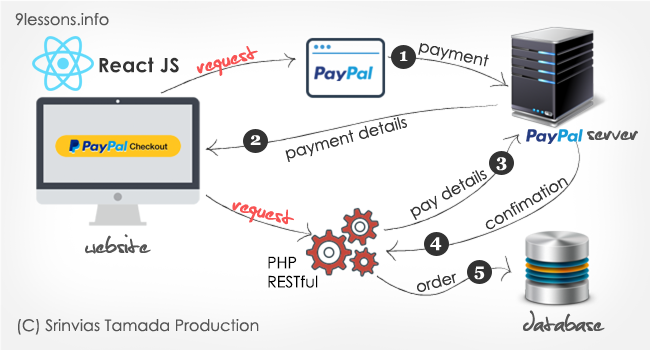
There are several payment options available in the market today. PayPal checkout option is one among them. In my previous articles, I have already discussed few payment options - Braintree PayPal using PHP, Payment system and PayPal Express Checkout with PHP and MySQL. These are the most viewed and trending articles till this day. Today, let’s see how the PayPal Express Checkout works with React JS.
Today we're excited to launch Cloud Firestore, a fully-managed NoSQL document database for mobile and web app development. It's designed to easily store and sync app data at global scale, and it's now available in beta.
Key features of Cloud Firestore include:
Documents and collections with powerful querying
iOS, Android, and Web SDKs with offline data access
Real-time data synchronization
Automatic, multi-region data replication with strong consistency
Node, Python, Go, and Java server SDKs
And of course, we've aimed for the simplicity and ease-of-use that is always top priority for Firebase, while still making sure that Cloud Firestore can scale to power even the largest apps.
Optimized for app development
Managing app data is still hard; you have to scale servers, handle intermittent connectivity, and deliver data with low latency.
We've optimized Cloud Firestore for app development, so you can focus on delivering value to your users and shipping better apps, faster. Cloud Firestore:
Synchronizes data between devices in real-time. Our Android, iOS, and Javascript SDKs sync your app data almost instantly. This makes it incredibly easy to build reactive apps, automatically sync data across devices, and build powerful collaborative features -- and if you don't need real-time sync, one-time reads are a first-class feature.
Uses collections and documents to structure and query data. This data model is familiar and intuitive for many developers. It also allows for expressive queries. Queries scale with the size of your result set, not the size of your data set, so you'll get the same performance fetching 1 result from a set of 100, or 100,000,000.
Enables offline data access via a powerful, on-device database. This local database means your app will function smoothly, even when your users lose connectivity. This offline mode is available on Web, iOS and Android.
Enables serverless development. Cloud Firestore's client-side SDKs take care of the complex authentication and networking code you'd normally need to write yourself. Then, on the backend, we provide a powerful set of security rules so you can control access to your data. Security rules let you control which users can access which documents, and let you apply complex validation logic to your data as well. Combined, these features allow your mobile app to connect directly to your database.
Integrates with the rest of the Firebase platform. You can easily configure Cloud Functions to run custom code whenever data is written, and our SDKs automatically integrate with Firebase Authentication, to help you get started quickly.
Putting the 'Cloud' in Cloud Firestore
As you may have guessed from the name, Cloud Firestore was built in close collaboration with the Google Cloud Platform team.
This means it's a fully managed product, built from the ground up to automatically scale. Cloud Firestore is a multi-region replicated database that ensures once data is committed, it's durable even in the face of unexpected disasters. Not only that, but despite being a distributed database, it's also strongly consistent, removing tricky edge cases to make building apps easier regardless of scale.
It also means that delivering a great server-side experience for backend developers is a top priority. We're launching SDKs for Java, Go, Python, and Node.js today, with more languages coming in the future.
Another database?
Over the last 3 years Firebase has grown to become Google's app development platform; it now has 16 products to build and grow your app. If you've used Firebase before, you know we already offer a database, the Firebase Realtime Database, which helps with some of the challenges listed above.
The Firebase Realtime Database, with its client SDKs and real-time capabilities, is all about making app development faster and easier. Since its launch, it has been adopted by hundred of thousands of developers, and as its adoption grew, so did usage patterns. Developers began using the Realtime Database for more complex data and to build bigger apps, pushing the limits of the JSON data model and the performance of the database at scale. Cloud Firestore is inspired by what developers love most about the Firebase Realtime Database while also addressing its key limitations like data structuring, querying, and scaling.
So, if you're a Firebase Realtime Database user today, we think you'll love Cloud Firestore. However, this does not mean that Cloud Firestore is a drop-in replacement for the Firebase Realtime Database. For some use cases, it may make sense to use the Realtime Database to optimize for cost and latency, and it's also easy to use both databases together. You can read a more in-depth comparison between the two databases here.
We're continuing development on both databases and they'll both be available in our console and documentation.
Get started!
Cloud Firestore enters public beta starting today. If you're comfortable using a beta product you should give it a spin on your next project! Here are some of the companies and startups who are already building with Cloud Firestore:
One of my favorite parts about working with the Cloud Functions for Firebase team is helping developers move logic from their mobile apps to a fully managed backend hosted by Firebase. With just a few lines of JavaScript code, they're able to unify logic that automatically takes action on changes to the contents of their Realtime Database. It's really fun to see what people build!
When Cloud Functionswas first announced at Cloud Next 2017, there was just one trigger available for all types of changes to the database. This trigger is specified using the onWrite() callback, and it was the code author's responsibility to figure out what sort of change occurred. For example, imagine your app has a chat room, and you want to use Firebase Cloud Messaging to send a notification to users in that room when a new message arrives. To implement that, you might write some code that looks like this:
exports.sendNotification = functions.database
        .ref("/messages/{messageId}").onWrite(event => {
    const dsnap = event.data  // a DeltaSnapshot that describes the write
    if (dsnap.exists() && !dsnap.previous.exists()) {
        // This is a new message, not a change or a delete.
        // Send notifications with FCM...
    }
})
Note that you have to check the DeltaSnapshotfrom the event object to see if new data now exists at the location of the write, and also if there was no prior data at that location. Why is this necessary? Because onWrite() will trigger on all changes to data under the matched location, including new messages, updated messages, and deleted messages. However, this function is only interested in newmessages, so it has to make sure the write is not an update or a delete. If there was an update or delete, this function would still get triggered and return immediately. This extra execution costs money, and we know you'd rather not be billed for a function that doesn't do useful work.
Today, it gets better
The good news is that these extra checks are no longer necessary with Cloud Functions database triggers! Starting with the firebase-functions module version 0.5.9, there are now three new types of database triggers you can write: onCreate(), onUpdate(), and onDelete(). These triggers are aware of the type of change that was made, and only run in response to the type of change you desire. So, now you can write the above function like this:
Here, you don't have to worry about this function getting triggered again for any subsequent updates to the data at the same location. Not only is this easier to read, it costs you less to operate.
Note that onWrite() hasn't gone away. You can still keep using it with your functions for as long as you like.
Avoid infinite loops with onWrite() and onUpdate()
If you've previously used onWrite() to add or change data at a location, you're aware that the changes you made to that data during onWrite() would trigger a second invocation of onWrite() (because all writes count as writes, am I right?).
Consider this function that updates the lastUpdated property of a message after it's written:
This seems OK at first, but there's something very important missing. Since this function writes back to the same location where it was triggered, it will effectively trigger another call to onWrite(). You can see here that this will cause an infinite loop of writes, so it needs some way to bail out of the second invocation.
It turns out that onUpdate() function implementations share this concern. One solution in this specific case could be to check the existing value of lastUpdated and bail out if it's not more than 30 seconds older than the current date. So, if we want to rewrite this function using onUpdate(), it could look like this:
exports.lastUpdate = functions.database
        .ref("/messages/{messageId}").onUpdate(event => {
    const msg = event.data.val()
    const now = new Date().getTime()
    if (msg.lastUpdated > now - (30*1000)) {
        return
    }
    msg.lastUpdated = now
    return event.data.adminRef.set(msg)
})
This function now defends against infinite loops with a little extra logic.
To start using these new triggers, be sure to update your firebase-functions module to 0.5.9. And for more information about these updates, check out the documentation right here.
Last April, we announcedthe general availability of the Firebase Admin SDK for Python. The initial release of this SDK supported two important features related to Firebase Authentication: minting custom tokens, and verifying ID tokens. Now, we are excited to announce that database support is available in the Firebase Admin SDK for Python starting from version 2.1.0.
Due to the way it's implemented, there are several notable differences between this API and the database APIs found in our other Admin SDKs (Node.js and Java). The most prominent of these differences is the lack of support for realtime event listeners. The Python Admin SDK currently does not provide a way to add event listeners to a database reference in order to receive realtime update notifications. Instead, all data retrieval operations are provided as blocking methods. However, despite these differences there's a lot that can be achieved using this API.
The database module of the Python Admin SDK facilitates both basic data manipulation operations and advanced queries. To begin interacting with the database from a Python environment, initialize the SDK with the Realtime Database URL:
import firebase_admin from firebase_admin import credentials
Then obtain a database reference from the db module of the SDK. Database references expose common database operations as Python methods (get(), set(), push(), update() and delete()):
from firebase_admin import db

root = db.reference()
# Add a new user under /users.
new_user = root.child('users').push({
    'name' : 'Mary Anning',
    'since' : 1700
})

# Update a child attribute of the new user.
new_user.update({'since' : 1799})

# Obtain a new reference to the user, and retrieve child data.
# Result will be made available as a Python dict.
mary = db.reference('users/{0}'.format(new_user.key)).get()
print 'Name:', mary['name']
print 'Since:', mary['since']
In the Firebase Realtime Database, all data values are stored as JSON. Note how the Python Admin SDK seamlessly converts between JSON and Python's native data types.
To execute an advanced query, call one of the order_by_* methods available on the database reference. This returns a query object, which can be used to specify additional parameters. You can use this API to execute limit queries and range queries against your data, and retrieve sorted results.
from firebase_admin import db

dinos = db.reference('dinosaurs')

# Retrieve the five tallest dinosaurs in the database sorted by height.
# 'result' will be a sorted data structure (list or OrderedDict).
result = dinos.order_by_child('height').limit_to_last(5).get()

# Retrieve the 5 shortest dinosaurs that are taller than 2m.
result = dinos.order_by_child('height').start_at(2).limit_to_first(5).get()

# Retrieve the score entries whose values are between 50 and 60.
result = db.reference('scores').order_by_value() \
    .start_at(50).end_at(60).get()
Take a look at the Admin SDK documentation for more information about this new API. Also check out our Github repo, and help us further improve the Admin SDK by reporting issues and contributing patches. In fact, it was your continuing feedback that motivated us to build and release this API in such a short period. Happy coding with Firebase!
Very long back, we had published a simple PHP login system using PHP, which works only with MySQL database. Today, we are providing you an easy registration and login process using PDO connection with better password encryption, which has an advantage of working on different database systems. PDO is a PHP extension that allow us to implement code which is portable across many databases and platforms. This registration process is used in our Wall Script 8. Here is the demo of this cool & simple login / registration process.
I received many tutorial requests from my readers that asked to me how to design Facebook style ajax background image upload and position adjustment using Jquery. I have been published many tutorials about ajax image upload, this one is very interesting and it is a combination of many features. I has implemented this in Wall Script, this post will explain you how to design timeline HTML frame, CSS techniques and database design for background image system.
Last few days I have been working with an important release from 9lessons.info, I am introducing many exciting features hope everybody will love. This post is about how to implement Group of Fan Page system using MySQL and PHP. Here I have discussed how to design a database and implementation of SQL queries, hope this post will help you to understand the Group/Page system.
I received few tutorial requests from my readers that asked to me, how to design Facebook style friend request system using MySQL. I had posted few tutorials about twitter style friend follow and follower concept designs, Facebook friend system is involved with few pending steps such as sending a request and accepting a request. Here I have discussed how to design a database and implementation of SQL queries, hope this post will help you to understand the friend system.
This post is the continuation of my previous AngularJS tutorial, I had explained JSON parsing using AngularJS. In this we are going to explain how to do two way data binding with Angular JS. Data binding is the most useful feature in AngularJS, It will help you to save from writing a lots of regular code.
Facebook like system is one of the best implementation in social network systems, may be in future based on like data Facebook going to launch semantic search engine. In this post I have explained how to implement like/unlike system database design and web implementation with PHP and jquery.
This post explains you how to design the Facebook Style message conversation system using PHP and MySQL. I have been working with messaging system at labs.9lessons.info, take a quick look at this post, how I have implemented database design tables and SQL queries. Login at labs.9lessons.info and try this live demo.
Now time to work with MongoDB NoSQL database management systems, it stores data into structured JSON like documents with dynamic schemas and improves application performance. This tutorial helps you how to create a simple login page using PHP and MongoDB. Try this download script and implement scalable application.